
You press play, hear a few familiar words, then the dialogue starts moving faster than you expected. With subtitles in your native language, you can follow the episode. With target-language captions, you catch more of the wording but feel as if you are reading instead of listening. Without either, you lose the plot.
This is not a sign that you have chosen the wrong setting. It is a sign that subtitles do different jobs.
The useful question is not “Which subtitle language is best?” It is: what do I need from this viewing session? Sometimes the answer is to understand a complicated plot well enough to enjoy it. Sometimes you want to connect a sound you missed with the words on screen. Sometimes you want an honest check of what your ears can do without help.
That distinction matters because reading a caption, understanding a story, noticing a useful phrase, and recognising speech in real time are related but different skills.
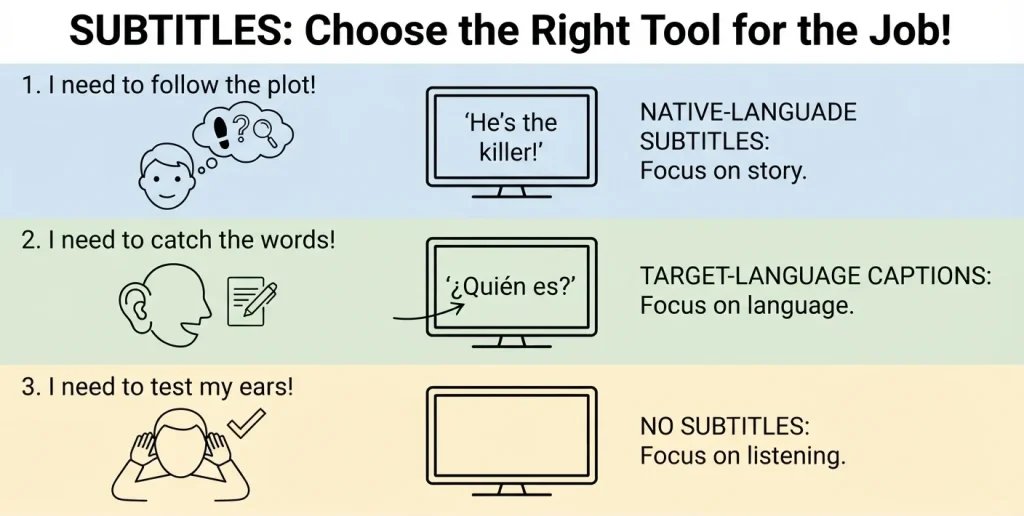
Choose subtitles by the job of this viewing session
Before changing a setting, name the job.
If you are watching a new crime episode with several characters and a plot you care about, the job may be orientation: who did what, and why. If you are replaying 40 seconds from an interview, the job may be to find the words hidden inside a fast stretch of speech. If you have already watched a familiar clip, the job may be to see what you understand by ear alone.
Those jobs point to different settings.
| Your immediate goal | Best first choice | What it gives you | Main limitation |
|---|---|---|---|
| Follow an unfamiliar or demanding plot | Native-language subtitles, used deliberately | Enough orientation to stay engaged | Your attention may settle on the translation |
| Notice wording and connect speech to print | Target-language captions | A visible bridge between sound and spelling | Reading support can hide gaps in listening |
| Check listening on a familiar, short segment | No subtitles | Clear evidence of what you recognise in the audio | It is a poor first-pass setting if you understand almost nothing |
| Resolve one confusing line | Dual subtitles, briefly | A quick comparison of meaning and wording | Two texts compete for attention if left on throughout |
Treat this as a choice for a single pass, not a permanent identity. A learner who uses native-language subtitles for the first viewing can use target-language captions on a later replay. Someone who regularly watches with target-language captions can take a short audio-only test without declaring subtitles off-limits forever.
Target-language captions help you notice speech, but they are not listening practice by themselves
Target-language captions are often the most useful default for an intermediate learner working with an accessible video. They let you match a sound with its written form: j’vais becomes je vais; a word you heard as one long blur turns out to be three short words; a familiar verb has an ending you did not catch.
That mapping is valuable because spoken language compresses and links words. You may know ¿qué has hecho? on the page yet hear something closer to a single unit in fast Spanish. Captions give you a way to check the mismatch instead of assuming that you have never learned the expression.
Use target-language captions when you can still follow enough of the video to connect the text with what is happening. They are particularly helpful for:
- an interview or explainer with useful repeated vocabulary;
- a familiar topic where visuals and prior knowledge support you;
- a short scene you plan to replay;
- a moment when you want to save a phrase in its original context.
The limitation is important. If your eyes stay on the captions from the first second to the last, you may understand the written text while missing how the audio works. That is not failure; it simply means the session has become reading-plus-video rather than a clean listening check.
A practical adjustment is to leave captions on for the first pass, then replay a 20- to 60-second section with the screen text off. Do not aim for every word. Try to catch the main point, the speaker’s attitude, and any phrase you had just noticed. Turn captions back on only to inspect a specific gap.
Native-language subtitles are useful for orientation, not a moral failure
Native-language subtitles can keep a difficult video enjoyable and comprehensible. That matters. If removing them turns a film into 90 minutes of guessing names and plot points, you are unlikely to return to it often enough to gain much from the experience.
They are most sensible when the content itself is the priority: a dense documentary, a new genre, a film with unfamiliar cultural references, or an episode you want to understand before studying a small scene. They can also give you an initial map of the story before you rewatch part of it with target-language captions.
The catch is attention. Your native language is usually faster and easier to process, so it can take over. You may finish an episode knowing exactly what happened but be unable to recognise the target-language line that delivered the key information.
Put a boundary around L1 subtitles rather than treating them as forbidden. For example:
- Watch the first 10 minutes of a new series with native-language subtitles so you know the setting and relationships.
- Choose one short, visually clear scene from that section.
- Rewatch it with target-language captions and listen for two expressions that matter to the scene.
- Replay the same scene without subtitles after a few days.
The first pass protects enjoyment. The later passes create an opportunity to attend to the target language. You do not need to convert every relaxing viewing session into study, either. Entertainment can remain entertainment.
Use no subtitles as a diagnostic, usually after an accessible pass
Audio-only viewing is useful when it tells you something specific. It can show whether you recognise a phrase you have seen before, whether word boundaries are causing trouble, or whether visuals and topic knowledge are carrying more of your comprehension than you realised.
It is less useful as an all-or-nothing test at the start of a video that is far above your current access. If you cannot identify the topic, the speaker’s main point, or any repeated expression, you are measuring material mismatch more than listening skill.
Instead, make the audio-only pass short and answerable. After watching a clip with target-language captions, turn them off and listen again. Then write three notes:
- What was the speaker’s main point?
- Which phrase did I now recognise without reading?
- Where did the sound still become unclear?
The third note is often more useful than the score you give yourself. Perhaps the problem was a reduced ending, a regional accent, background music, a word you do not know, or a boundary between words. Different problems call for different next steps.
Dual subtitles solve a local problem; they are rarely a good permanent setting
Dual subtitles can be handy when a line feels confusing in a way that changes the meaning. You may see the target-language wording, compare it with the translation, and notice that a literal translation would miss the joke, register, or implied subject.
Use them like a dictionary: open them to answer one question, then close the extra layer. Leaving two subtitle tracks on throughout a full episode asks you to divide attention between sound, target-language text, native-language text, and visuals. Most learners will end up prioritising one of them anyway.
Suppose a French character says, Ça me revient. A dual display may help you see that the subtitle “I remember now” is conveying the sense rather than matching word for word. That is a useful observation. It does not mean you need two lines of text for the rest of the film.
Try caption fading with one short clip
Caption fading is a calmer alternative to trying to quit subtitles in one jump. Use a clip of roughly one to three minutes that has clear audio, a topic you can identify, and a caption track you trust.
First pass: choose support for meaning
If the clip is manageable, start with target-language captions. If it is part of a story you do not yet understand, a brief native-language-subtitle pass is reasonable. Your aim is to know the basic situation and main idea.
Second pass: test a small segment without captions
Choose 20 to 60 seconds, not the entire clip. Listen for familiar chunks and try a one-sentence retell. The test stays small enough that you can remember what the speaker was talking about.
Third pass: check only the mismatches
Turn on target-language captions or use a transcript. Locate the places where your hearing and the text did not match. Notice whether you missed a known word because it was linked to the next one, mistook one word for another, or genuinely need to learn the phrase.
If an item is worth keeping, save the phrase with the surrounding sentence and the moment it occurred. Aprelendo can be useful here: its subtitles or transcripts can keep the phrase connected to the video rather than turning it into an isolated translation. Keep the harvest small enough to revisit.
Revisit later without captions
A few days later, replay the same short segment without text. You are not trying to prove that subtitles made you dependent. You are checking whether the sound now triggers meaning more readily. If it does not, replay with captions, listen again, and move on. One clip does not need to yield total mastery.
Caption quality can change the right choice
A caption track is not always a reliable transcript of what was said. Closed captions may describe sound effects; subtitles may be shortened or paraphrased for reading speed; dubbed audio may not match subtitles written for the original track. Auto-generated captions introduce another problem: YouTube warns that they can misrepresent speech because of pronunciation, accents, dialects, or background noise.
Before using captions to diagnose your listening, check a few lines you already understand. If the captions repeatedly omit words, lag far behind the speech, or make obvious mistakes, use them only as rough support. A creator-provided transcript, an official script, or another clip may be a better study choice.
Also check that you have not accidentally paired a dub with subtitles for the original audio. If the lip movements, wording, and timing seem consistently wrong, the problem may be the track, not your listening.
Common subtitle mistakes worth avoiding
Removing all subtitles too early
If caption-free viewing gives you no usable meaning, return some support. Build the audio-only element around short replays, familiar scenes, or well-matched clips.
Treating L1 subtitles as either cheating or the answer to everything
They can preserve plot comprehension. They rarely give sustained attention to target-language sounds. Use them for the first job, then change the setting when you want the second.
Assuming target-language captions automatically train your ears
They can help you notice how sounds map to words. To test recognition, make time for a later replay without text.
Trusting every auto-captioned line
When the text itself is wrong, it cannot tell you what you missed. Check quality before turning a video into a study resource.
FAQ
Are subtitles bad for language learning?
No. They are scaffolds. A good scaffold supports a task you can then revisit with less support. The most useful setting depends on whether you need plot comprehension, language noticing, or a listening check.
Should beginners use native-language subtitles?
They can, especially when the alternative is abandoning the video. Beginners may get more from short, familiar clips than from complex films. Add target-language captions later when there is enough vocabulary to make the text meaningful.
How can I stop relying on subtitles?
Do not start by banning them from every programme. Pick short clips you understand with support, then add brief caption-free replays. Increase the length or difficulty only when those replays still leave you with a main idea to work from.
Are auto-generated YouTube captions accurate enough?
Sometimes, but quality varies. Check several lines against clear speech first. YouTube itself notes that accents, dialects, background noise, and pronunciation can lead automatic captions to misrepresent the spoken content.
Make the setting serve the next ten minutes
For your next video, choose one job before you press play. If you want the plot, give yourself permission to use native-language subtitles for orientation. If you want to notice language, choose target-language captions and mark a couple of sound-to-text mismatches. If you want to check listening, replay a short familiar section without any text.
That small decision prevents subtitles from becoming either a permanent crutch or an unnecessary test of endurance. Once you know which kind of support you need, you can build it into a longer video routine, such as a focused 20-minute YouTube study loop.
Sources
- Peters, E., Heynen, E., & Puimège, E. (2016). Learning Vocabulary Through Audiovisual Input: The Differential Effect of L1 Subtitles and Captions.
- Peters, E., & Webb, S. (2018). Incidental Vocabulary Acquisition Through Viewing L2 Television and Factors That Affect Learning. Studies in Second Language Acquisition.
- YouTube Help. Use automatic captioning.

Leave a Reply