
If you’re looking for an efficient way to add new texts to your Aprelendo library, RSS feeds are a powerful, though often overlooked, tool. This tutorial will walk you through what RSS is, how to find and use RSS feeds for texts, and how to integrate them into Aprelendo to enhance your language learning experience.
What is RSS, and Why Should You Care?
RSS (Really Simple Syndication) is a technology that allows users to subscribe to updates from websites. It’s like a personalized news feed that brings you the latest articles, blogs, or podcasts directly to one place. Although it’s an older technology, RSS remains widely used, particularly for podcasts and news updates, because of its efficiency and simplicity.
RSS feeds are structured in XML format and contain summaries or full versions of the content. For example, when a news site publishes a new article, its RSS feed is automatically updated. By subscribing to these feeds, you can keep track of updates without needing to visit each website manually.
How to Get RSS Feeds for Texts
Many websites, particularly news platforms, blogs, and content aggregators, offer RSS feeds. To find an RSS feed:
- Check the Website: scroll to the footer or “About” section of a site. Look for an orange RSS icon or a link labeled “RSS Feed.”
- Search Online: if the feed isn’t visible, use a search engine. For example, search:
site:example.com intitle:rssorsite:example.com inurl:feed. - RSS Feed Directories: websites like Feedly or RSS Feed Reader can help you discover feeds.
- Browser Extensions: tools like RSS Feed Reader or Sage can automatically detect feeds on a website.
- Inspect the Page Source: view the page source and search for “rss” or “feed” to locate the feed URL.
Example: if you’re interested in technology news, TecMundo provides its feed at https://rss.tecmundo.com.br/feed, which can be copied directly into Aprelendo.
If you want a large, curated collection of reliable and tested RSS feeds, especially for news, you can also explore the open-source project news-feed-list-of-countries on GitHub. It contains hundreds of country-specific news RSS feeds that work well and are regularly maintained.
How to Add RSS Texts to Aprelendo
Once you have your RSS feed URL, you can easily integrate it into Aprelendo.
Step 1: Navigate to the RSS Feed Section
- Log into your Aprelendo account and go to the “My Texts” section.
- Click on the language flag, then select Settings.
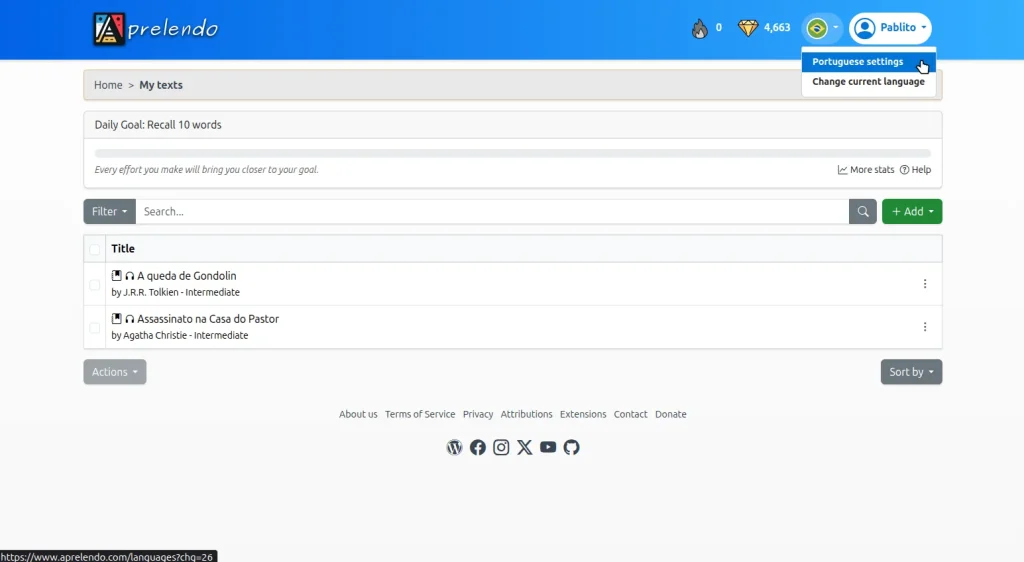
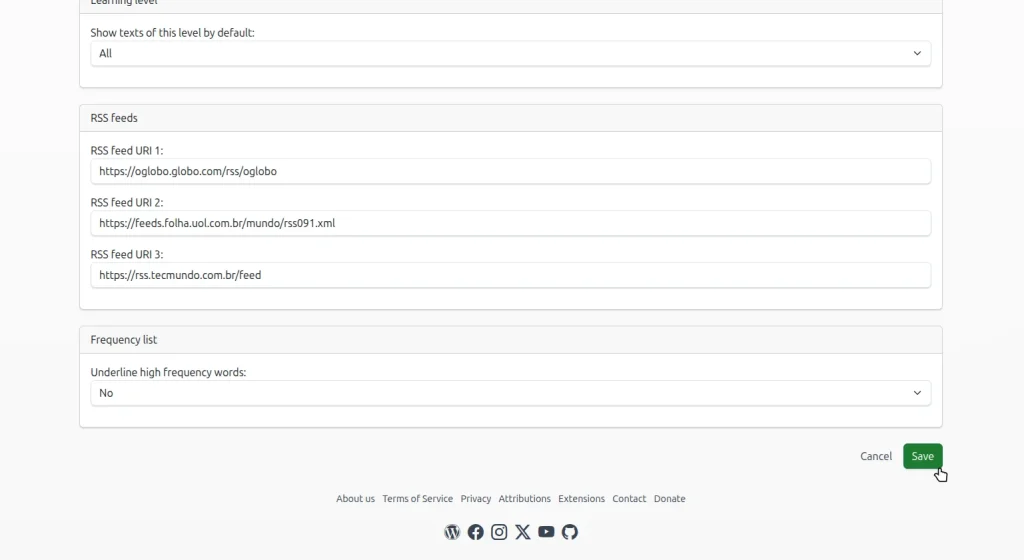
Step 2: Add RSS Feed URLs for that Language
- Paste the URL of your RSS feed into one of the three available slots. You can add up to 3 RSS feeds per language, and each feed displays the last 10 articles.
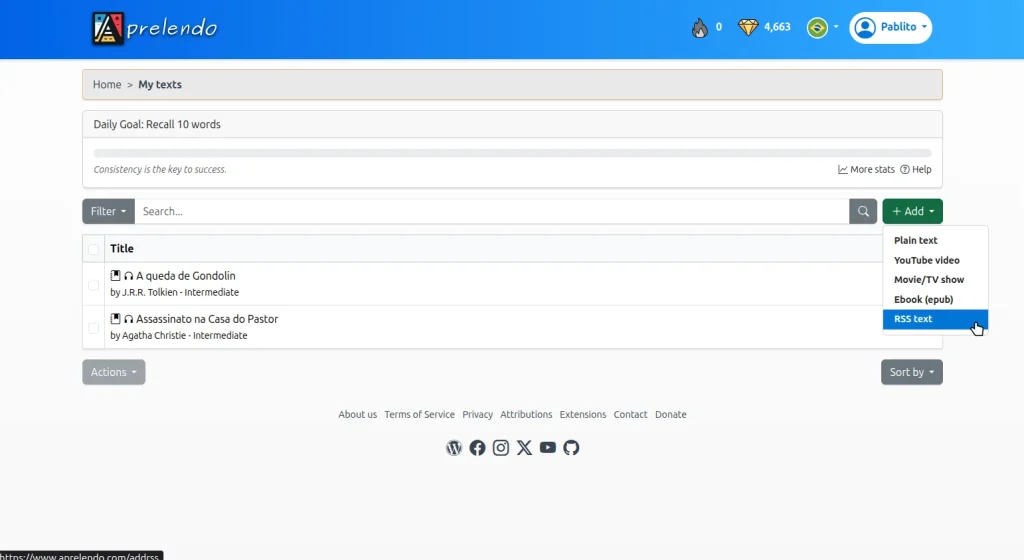
Step 3: Add Texts from RSS Feeds
- Go to Add > RSS Text to see the most recent articles from your configured feeds.
Step 4: Add & Edit the Text
For each article, you’ll see a single main action:
- Add & Edit: opens the article in edit mode and automatically attempts to load the full text. You can review, clean up, or adjust the content before saving it to your library.
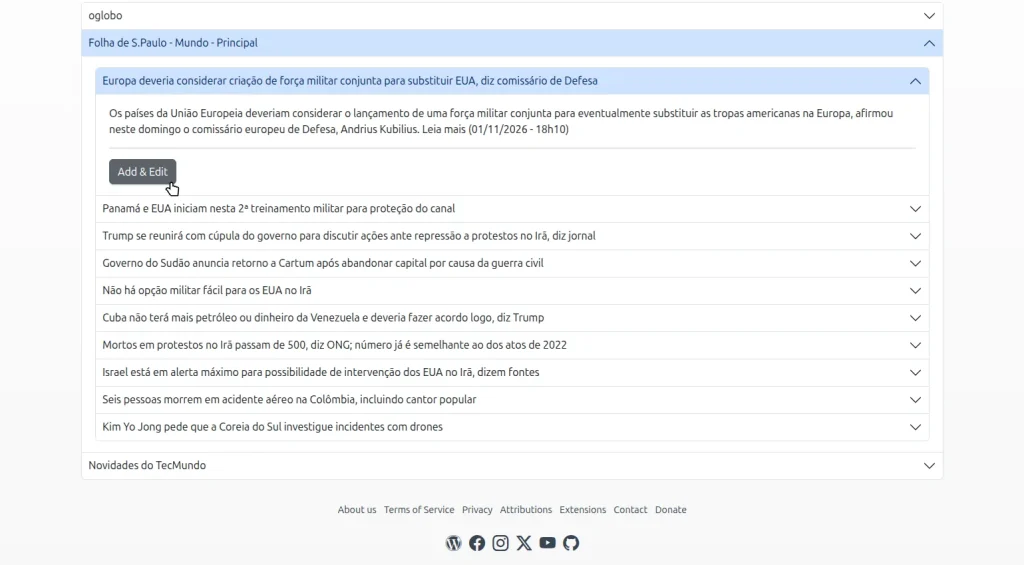
Tip: many RSS feeds only include summaries by default. When you click Add & Edit, Aprelendo will automatically try to retrieve the full article content from the source, saving you the hassle of doing this manually.
Step 5: Save and Start Reading
- Once you’re satisfied with the text, click Save to add it to your Aprelendo library.
Advantages and Disadvantages of Adding Texts via RSS Feeds
Advantages
- Efficiency: new content arrives automatically from your favorite sources.
- Diversity: access a wide range of texts without manual searching.
- Control: review and edit texts before adding them to your study library.
Disadvantages
- Summaries in Some Feeds: not all feeds provide full content.
- Feed Limits: a maximum of 3 RSS feeds per language.
- Recency Bias: only the latest 10 articles per feed are shown.
Conclusion
RSS feeds are an excellent way to keep your Aprelendo library fresh with minimal effort. With automatic full-text retrieval and the flexibility to edit before saving, RSS integration gives you both convenience and control over your learning materials.
Explore different feeds, experiment with topics you enjoy, and let RSS streamline your language-learning workflow with Aprelendo.
Leave a Reply